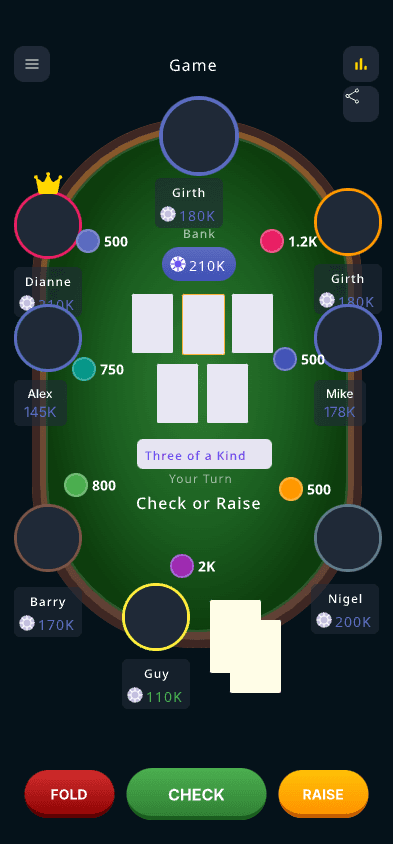
The best poker tracker depends on your game. Bankroll apps log sessions after the fact; live chip trackers run the table while you play; HUD software analyzes online hands. This guide compares the leading free options for live and home-game players — what each one does, what the free tier includes, and whether your friends need to install anything.
Free-tier details and pricing reflect public product information at the time of writing and may change.
App
PokerChip.live
Platform
Web (any device)
Free tier
Full live tracking, settlement, stats
Download needed
No — browser link
Best for
Live chip tracking at in-person games
App
Poker Bankroll Tracker
Platform
iOS / Android
Free tier
Session logging with limits
Download needed
Yes
Best for
Long-term bankroll logging
App
Poker Stack
Platform
iOS / Android
Free tier
Fully free session logging
Download needed
Yes
Best for
Simple session logs without spreadsheets
App
Left Pocket
Platform
iOS
Free tier
Free up to a session cap, then paid
Download needed
Yes
Best for
Session review and study tools
App
Poker Analytics 7
Platform
iOS / iPad / Watch
Free tier
Freemium
Download needed
Yes
Best for
Deep stats for serious grinders
App
Poker Income
Platform
iOS / Android / Web
Free tier
Free tracking
Download needed
App or web
Best for
Beginner-friendly income tracking
App
Platform
Free tier
Download needed
Best for
PokerChip.live
Web (any device)
Full live tracking, settlement, stats
No — browser link
Live chip tracking at in-person games
Poker Bankroll Tracker
iOS / Android
Session logging with limits
Yes
Long-term bankroll logging
Poker Stack
iOS / Android
Fully free session logging
Yes
Simple session logs without spreadsheets
Left Pocket
iOS
Free up to a session cap, then paid
Yes
Session review and study tools
Poker Analytics 7
iOS / iPad / Watch
Freemium
Yes
Deep stats for serious grinders
Poker Income
iOS / Android / Web
Free tracking
App or web
Beginner-friendly income tracking
What each kind of tracker actually does
Prices move and free tiers get rewritten, so this compares the things that do not change: what the tool is for, whether it needs installing, and whether it can follow a game happening on a real table in front of you. Check current pricing on each vendor's own site before paying for anything.
Tool
PokerChip.live
Kind
Live chips + settlement
Needs a download
No — browser
Works for a live home game
Yes, that is the point
Cost shape
Free, Pro optional
Tool
ChipStack
Kind
Live chip tracker
Needs a download
No — browser
Works for a live home game
Yes
Cost shape
Free
Tool
Chips of Fury
Kind
Live chips
Needs a download
Yes — mobile app
Works for a live home game
Yes
Cost shape
Free with ads
Tool
Poker Bankroll Tracker
Kind
Session logger
Needs a download
Yes — mobile app
Works for a live home game
After the game only
Cost shape
Freemium
Tool
PokerCharts
Kind
Session logger
Needs a download
No — browser
Works for a live home game
After the game only
Cost shape
Freemium
Tool
PokerTracker 4
Kind
HUD / hand analysis
Needs a download
Yes — desktop
Works for a live home game
No, needs hand histories
Cost shape
Paid licence
Tool
Holdem Manager 3
Kind
HUD / hand analysis
Needs a download
Yes — desktop
Works for a live home game
No, needs hand histories
Cost shape
Paid licence
Tool
Kind
Needs a download
Works for a live home game
Cost shape
PokerChip.live
Live chips + settlement
No — browser
Yes, that is the point
Free, Pro optional
ChipStack
Live chip tracker
No — browser
Yes
Free
Chips of Fury
Live chips
Yes — mobile app
Yes
Free with ads
Poker Bankroll Tracker
Session logger
Yes — mobile app
After the game only
Freemium
PokerCharts
Session logger
No — browser
After the game only
Freemium
PokerTracker 4
HUD / hand analysis
Yes — desktop
No, needs hand histories
Paid licence
Holdem Manager 3
HUD / hand analysis
Yes — desktop
No, needs hand histories
Paid licence
Use casePokerChip.live fitWhat to compare
Live home gamesStrongRoom join speed, live stacks, player actions
Bankroll apps ask you to type in buy-ins and results after the session — useful for analytics, but nothing happens at the table. A live tracker like PokerChip.live replaces the chips themselves: stacks, blinds, pots, and settlement update in real time while you play, and your session history falls out automatically.
Compare friction, not feature lists
Home-game tools win when the first player can create a room and everyone else can join without installing anything. Every app-store tracker fails that test for the guest with a full phone or an old OS; a browser link works on all of them.
Watch the free-tier limits
Several popular trackers cap free usage — session limits, locked graphs, or paid exports. Check what happens after week three of a weekly game before your group standardizes on a tool.
HUD software is a different category
PokerTracker 4 and Hold'em Manager analyze online hand histories for real-money grinders. They are powerful but irrelevant to live home games — you cannot import hands that happened on your kitchen table.
Look for social loops
Shareable results, standings, and rematch links make a tracker more likely to bring players back. Recurring groups get the most value from tools with club history rather than solo logs.
The three things called a poker tracker
Search for a poker tracker and you get three unrelated products. A HUD like PokerTracker 4 or Holdem Manager reads hand-history files from an online site and overlays statistics on your opponents — it cannot see a game played with real cards. A bankroll logger records a session after it finishes: date, stake, buy-in, cash-out. A live chip tracker runs the table while you play, holding stacks, pots and payouts in real time. Deciding which one you want takes ten seconds and saves you from downloading the wrong thing.
For a home game, the HUD category is a dead end
The expensive, well-known trackers are built around importing hand histories from online poker sites. There is no hand history at a kitchen table; the cards are physical and nothing is logged. Every review that ranks PokerTracker 4 as the best free poker tracker is answering a different question from the one a home-game host is asking, and the free trials all expire before you have played a second session.
Free tiers are limited by time, not by features
The usual shape is a generous feature list with a cap you meet in week three: a session limit, a history window that hides anything older than thirty days, or an export button that is the one paid thing. None of that is dishonest, but it matters for a recurring game. Before you commit a group to a tool, find the page that says what the free tier stops doing, and check whether your data comes back out if you stop paying.
The number that actually decides it is friction at the door
A tracker only works if everyone at the table uses it. That makes the sign-up flow more important than any feature: an app-store download plus an account plus a friend request is three chances for somebody to say they will just remember their buy-ins. A link or a QR code that opens a working seat is one. If you take nothing else from this comparison, compare how a guest joins before you compare anything else.
What a home game genuinely needs recorded
Buy-ins, rebuys, cash-outs, and who owes whom at the end. That is the whole list. Win rate, hourly, variance graphs and range analysis are all downstream of those four numbers, and any tool that gets them right can produce the rest later. A tracker that captures elaborate statistics but makes rebuys awkward will be abandoned by the second session, because rebuys are what actually happen at one in the morning.
Where PokerChip.live sits, honestly
It is a live chip tracker with settlement, not a HUD and not a solver. It runs in a browser, guests join from a link without an account, and it records buy-ins, cash-outs and the final ledger as the game happens. If you play online and want opponent statistics overlaid on a table, this is the wrong tool and PokerTracker is the right one. If you deal real cards at a real table and want the chips and the money handled, this is what it was built for.
Using two tools is normal
Nothing stops you running live chips during the game and logging the session into a bankroll app afterwards, and plenty of serious players do exactly that. The two categories answer different questions — what is happening now, and how you are doing over a year — and the overlap between them is small enough that picking one is often the wrong move.
FAQ
Questions about best free poker tracker apps
01
What is the best free poker tracker app for home games?
For live digital chip tracking, PokerChip.live is a strong choice. For bankroll-only analytics, a dedicated bankroll tracker may fit better.
02
Do poker tracker apps need downloads?
Most of the well-known ones are App Store or Play Store downloads, which means every player at the table has to install something before the game can start. PokerChip.live runs in the browser instead, so a shared link is all anyone needs.
03
Do I have to sign up to use a free poker tracker?
Many free trackers gate the first session behind an account so they can attach your data to a profile. PokerChip.live lets players join a room and play without registering — an account only matters if you want the history to persist across sessions.
04
Does a poker tracker work on a phone?
It has to. At a home game everyone already has a phone on the table and nobody has a laptop, so anything that is not mobile-first goes unused after the first night. Check that joining, betting and settling all work one-handed on a phone screen.
05
What is the difference between free and paid poker trackers?
Paid trackers mostly sell online-play analysis: hand histories imported from poker sites, opponent statistics and heads-up displays. Free trackers cover what a home game actually needs — buy-ins, stacks, pots and who owes what at the end of the night.
06
Can a poker tracker handle home games rather than online play?
Only some of them. Most trackers assume you are importing hand histories from an online poker room, which a live kitchen-table game does not produce. Look for tools built around buy-ins, chip stacks and end-of-session settlement instead.
07
What should home-game hosts compare?
Compare setup speed, player joining, settlement, privacy, live sync, and whether players will actually use it at the table.
08
Is free enough for recurring games?
Free features are often enough to start. Recurring groups may later care more about history, exports, and advanced stats.
09
Can I use multiple tools?
Yes. Some groups use one tool for live chip tracking and another for deep bankroll analysis, and the two rarely conflict because they run at different stages of the night.
010
Is PokerTracker free?
No. PokerTracker 4 and Holdem Manager 3 are paid desktop licences with time-limited trials. They also only work with hand histories from online sites, so they cannot follow a game played with real cards.
011
What is a poker HUD?
A heads-up display that overlays statistics on your opponents while you play online, built from hand histories the poker client writes to disk. There is no equivalent for a live game because nothing is being logged.
012
Can a free tracker handle rebuys?
It should, and this is worth testing before your group commits. Rebuys are the most common thing that happens late in a home game and the thing thin tools handle worst.
Ready to run the next poker night?
Create a free room, invite players, track live stacks, and share the final result when the game ends.