도구를 바꾸기 전에 생각할 것 한 가지
정기 모임에서 도구를 바꾸는 비용은 본인이 아니라 나머지 일곱 명에게 발생합니다. 혼자 앱을 까는 데는 이 분이면 되지만, 일곱 명이 모두 설치하고 가입하고 비밀번호를 기억하게 만드는 일은 테이블에서 삼십 분을 잡아먹고, 다음에 새 친구가 오면 처음부터 다시 합니다. 그러니 질문은 어느 쪽 기능이 많은지가 아니라, 오늘 한 명이 더 왔을 때 그 사람이 앉기까지 몇 단계인지입니다.
무료 · 설치 없음 · 손님은 가입 없음
디지털 칩 도구를 고를 때 실제로 볼 것은 네 가지뿐입니다. 방을 여는 데 걸리는 시간, 손님이 얼마나 쉽게 들어오는지, 테이블에서 자기 스택이 한눈에 보이는지, 그리고 끝나고 계산이 맞아떨어지는지. Chips of Fury는 완성도 높은 모바일 앱이고 변형 게임이 많아 같은 사람들이 여러 종목을 오래 즐기는 모임에 맞습니다. PokerChip.live는 설치가 없는 브라우저 도구이고, 하룻밤에서 가장 자주 어긋나는 지점인 기록과 정산에 힘을 씁니다.
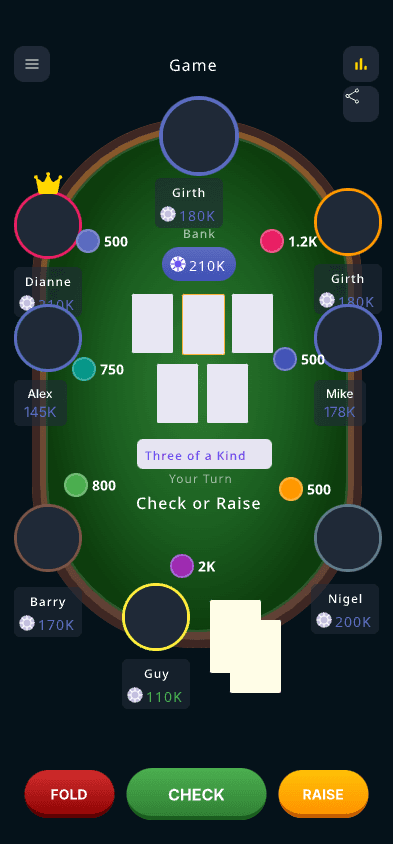
첫 핸드까지 두 단계, 방 만들고 여섯 자리 코드 공유
손님은 설치도 가입도 이메일도 없이 착석
바이인과 리바이, 중간 캐시아웃이 기록으로 남고 정산은 자동
기능 개수의 문제가 아닙니다. 한쪽은 게임을 앱 안으로 옮기고, 다른 한쪽은 칩과 장부만 대체하고 카드는 테이블에 남깁니다.
항목
형태
Chips of Fury
모바일 앱, 설치 필요
PokerChip.live
브라우저, 열면 바로
항목
손님 참가
Chips of Fury
각자 설치하고 로그인
PokerChip.live
여섯 자리 코드나 QR, 가입 없음
항목
게임 변형
Chips of Fury
많음, 딜러스 초이스 포함
PokerChip.live
홀덤 중심
항목
칩과 블라인드
Chips of Fury
있음
PokerChip.live
있음
항목
바이인과 캐시아웃 기록
Chips of Fury
있음
PokerChip.live
있음
항목
종료 후 정산
Chips of Fury
있음
PokerChip.live
최소 송금 횟수로
항목
세션 간 전적
Chips of Fury
있음
PokerChip.live
클럽과 시즌 순위
정기 모임에서 도구를 바꾸는 비용은 본인이 아니라 나머지 일곱 명에게 발생합니다. 혼자 앱을 까는 데는 이 분이면 되지만, 일곱 명이 모두 설치하고 가입하고 비밀번호를 기억하게 만드는 일은 테이블에서 삼십 분을 잡아먹고, 다음에 새 친구가 오면 처음부터 다시 합니다. 그러니 질문은 어느 쪽 기능이 많은지가 아니라, 오늘 한 명이 더 왔을 때 그 사람이 앉기까지 몇 단계인지입니다.
모바일 앱의 사용감이 웹보다 나은 것은 대체로 사실이고 다툴 일이 아닙니다. 대가는 문턱이 앞으로 당겨진다는 것입니다. 스토어, 다운로드, 가입, 이메일 인증 중 어느 하나에서 막히면 테이블 전체가 기다립니다. 브라우저 도구에는 그 구간이 없습니다. 여섯 자리 숫자를 불러주면 가장 느린 사람도 타자 속도만큼만 느립니다. 새 얼굴이 자주 오는 모임이라면 이 차이가 어떤 기능 차이보다 큽니다.
다들 당신의 액션을 기다리는 삼 초 동안 세 가지를 봐야 합니다. 내 스택, 팟 크기, 지금 누구 차례인지. 글씨가 작거나, 팟을 보려면 스크롤해야 하거나, 베팅에 세 번을 눌러야 하면 첫 핸드에는 아무렇지 않다가 오십 번째 핸드에서 누군가 포기하고 현금과 노트로 돌아갑니다. 고르기 전에 테이블에서 가장 작은 휴대폰으로 한 번 열어보십시오.
매주 오마하와 세븐 스터드와 딜러스 초이스를 돌린다면 변형 지원이 넓은 앱이 맞습니다. 반대로 사실상 홀덤만 치고 사람이 자주 바뀐다면, 진짜 아픈 지점은 끝나고 나서의 계산입니다. 쓰지 않는 변형은 일 년에 한 번도 열리지 않지만 정산은 매주 해야 합니다. 기능 목록이 아니라 실제로 치는 것을 기준으로 고르십시오.
하룻밤이 끝나면 누군가는 두 번 리바이했고, 누군가는 먼저 갔고, 올인 한 번으로 사이드팟이 생겼습니다. 기록이 없으면 계산기를 들고 서로의 기억을 맞추게 되고, 거의 반드시 누군가는 잘못 기억합니다. 도구의 값어치는 여기에 몰려 있습니다. 바이인과 캐시아웃을 장부로 남기고, 끝나면 누가 누구에게 얼마를 보낼지 최소 송금 횟수로 알려주는 것.
본 게임에서 처음 써보지 마십시오. 시작 십 분 전에 두세 명이 전체 흐름을 한 번 돌려보면 됩니다. 방 만들기, 참가, 바이인, 올인으로 사이드팟, 한 명 먼저 캐시아웃, 정산표 확인. 이 십 분이 어떤 비교 글도 답해주지 못하는 질문에 답합니다. 우리 사람들이 쓰기에 편한가. 두 도구를 각각 이렇게 해보면 대개 답이 분명해집니다.
FAQ
01
PokerChip.live가 브라우저에서 바로 쓰는 대안입니다. 칩, 블라인드, 사이드팟, 바이인과 캐시아웃, 정산을 다루고 손님은 설치나 가입 없이 참가합니다.
02
아니요. 주최자도 참가자도 브라우저에서 씁니다. 휴대폰, 태블릿, 노트북 어디서든 됩니다.
03
아닙니다. 여섯 자리 방 코드를 넣거나 QR을 찍으면 앉습니다. 계정도 이메일도 필요 없습니다.
04
홀덤 중심입니다. 종목을 자주 바꾸거나 딜러스 초이스 같은 기능이 필요하면 변형 지원이 넓은 앱이 더 맞습니다.
05
됩니다. 올인으로 팟이 갈라지면 메인팟과 사이드팟이 자동으로 나뉘고 누가 어느 팟을 가져갈 자격이 있는지 함께 기록됩니다.
06
각자의 바이인과 최종 스택으로 손익을 내고 송금 횟수가 가장 적은 조합을 제안합니다. 여덟 명이 서로 주고받을 때 스무 번이 넘는 대신 대개 다섯에서 여섯 번으로 끝납니다.
07
네. 칩과 장부만 대체하고 딜링은 하지 않습니다. 셔플과 딜은 테이블에서 그대로 합니다.
08
무료입니다. 광고를 없애고 클럽과 시즌 기록을 여는 선택형 프로 버전이 있지만 방 개설, 참가, 기록, 정산은 무료입니다.
무료로 방을 만들고 플레이어를 초대하세요. 실시간으로 스택을 기록하고 게임이 끝나면 결과를 공유할 수 있습니다.
게임 방 만들기